Shooter: A QBASIC Game Port
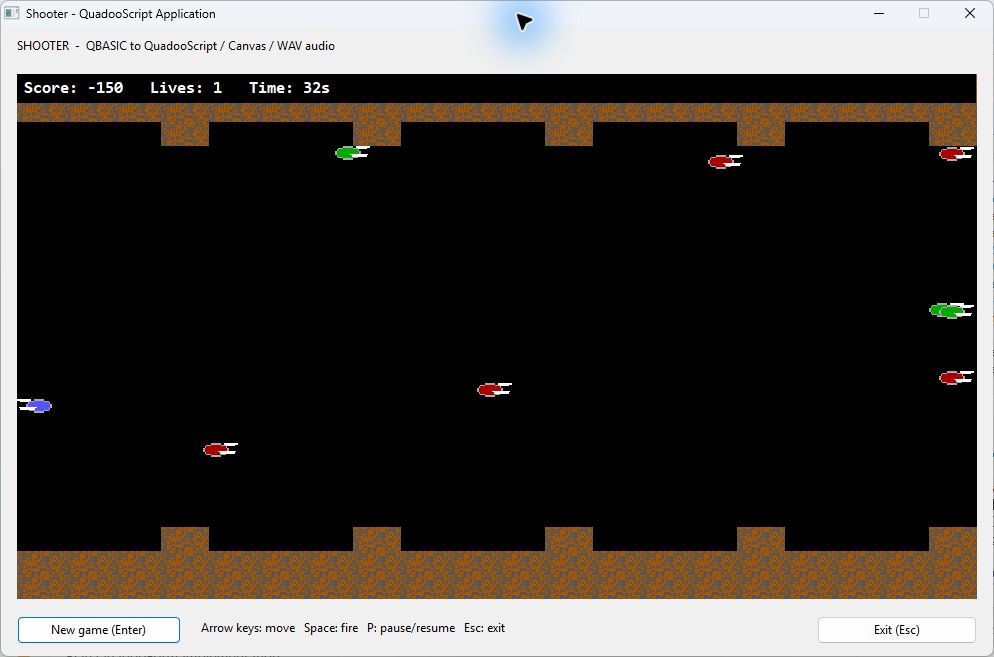
This example ports the supplied shooter.bas program to a native QuadooScript Application. A black Canvas displays the ships, missiles, terrain, explosions, and score. A 50 ms Windows Timer advances the game and draws each frame, Form keyboard events handle input, and preloaded WAV binary objects supply the sound effects.
Download the complete Shooter project and Win32 build — QuadooScript sources, designer Form, original BASIC program, generated graphics and WAV files, asset generator, checks, and a ready-to-run executable with its runtime DLLs.
Built and checked with the local Win32 release Studio, Canvas/Sprite runtime, and sound-enabled Application host on November 4, 2026. This walkthrough uses static HTML and CSS.
Contents
- Build and play
- Canvas, Timer, and Form configuration
- Replacing the BASIC screen loop
- Keyboard input at Form level
- Porting the graphics to Canvas sprites
- Converting SOUND to preloaded WAV files
- Game rules and deliberate adaptations
- Project contents and distribution
- Validation and implementation references
Build and Play
- Extract the ZIP to a writable project folder. Open
ShooterExample.qsprojusing File > Open Project... in Win32 Quadoo Studio. - Use the matching current
AQVMT.binand runtime DLLs beside Studio. This example uses the Canvas, Sprite, andHost.PlaySoundAsyncimplementations available in the November 4, 2026 release build. - Choose Project > Start Without Debugging (Ctrl+F5). Studio builds and launches
bin\Win32\ShooterExample.exe. The ZIP also includes that build for running directly. - Move with the arrow keys and fire with Space. Press P to pause or resume. Switching to another window pauses the game and clears held keys.
- Use Enter or New game to restart, and Escape or Exit to close the application.
The playfield retains the original 640×350 game coordinates. At 96 DPI the Canvas is 960×525 physical pixels, giving a 1.5× display. The source uses the Canvas's actual pixel size to calculate its rendering scale.
There are two enemy colors, 100 reusable missile slots, ten enemy slots, an extra-life condition, and a boss encounter after roughly three minutes of unpaused game time. The original Lives counter starts at 3 and ends the game when it drops below zero; the port retains that four-loss rule.
Canvas, Timer, and Form Configuration
ShooterForm.qform.json contains one Form, the Canvas, title/help labels, two dialog buttons, and a nonvisual Timer. The relevant designer settings are:
| Object | Settings | Events |
|---|---|---|
ShooterForm | KeyPreview = true; fixed-size Single border | OnCreate, OnShow, OnClose, OnLeave, OnKeyDown, OnKeyUp, OnKeyPress |
Video (Canvas) | BackColor = 0 (black), AutoRedraw = true, DoubleBuffered = true, ScaleMode = Pixels, Width 960, Height 525 | OnResize rebuilds scaled sprite images if needed |
FrameTimer | Interval = 50 milliseconds; initially Enabled = false | OnTimer → FrameTimer_Tick |
NewGameButton | Default = true | OnClick → NewGame_Click |
ExitButton | Cancel = true | OnClick → Exit_Click |
"properties": {
    "Caption": "Shooter - QuadooScript Application",
    "Width": 992,
    "Height": 630,
    "KeyPreview": true
}

// Canvas properties:
"BackColor": 0,
"AutoRedraw": true,
"DoubleBuffered": true,
"ScaleMode": "Pixels"

// Timer properties:
"Enabled": false,
"Interval": 50
These are settings excerpts; the actual Form also contains identities, bounds, and handler names. Studio maintains the Canvas, Timer, and button member declarations in the source's managed region. The general designer and event workflow applies to this project too.
Replacing the BASIC Screen Loop
The BASIC program uses SCREEN 9, PSET/LINE/CIRCLE/PAINT, GET/PUT sprite buffers, an unrestricted DO loop, and PCOPY to present the offscreen page. The port separates simulation from presentation:
| BASIC responsibility | QuadooScript implementation |
|---|---|
| Shared player, enemy, and missile state | ShooterGame, with JSON objects in reusable arrays |
| Main DO loop and screen page copy | A 50 ms Timer calls Game.Step(), PlayEffects(), and Render() |
| INKEY$ input | Form keyboard handlers update held-key flags and pending taps |
| GET/PUT image buffers | Canvas-associated Sprite objects created once from embedded RGBA pixels |
| LOCATE / PRINT score | Video.DrawText draws the HUD on the Canvas |
| SOUND statements | Pre-generated PCM WAVs, preloaded as binary objects and played asynchronously |
Initialization finishes decoding the WAVs and preparing the sprites before enabling the Timer:
Sounds = LoadShooterSounds();
Scale = min((double)Video.PixelWidth / 640,
            (double)Video.PixelHeight / 350);
Sprites = LoadShooterSprites(Video, Scale);
Game = new ShooterGame(timer());
Ready = true;
Render();
FrameTimer.Enabled = true;
virtual function FrameTimer_Tick (args)
{
if(Ready && !Paused && !Game.GameOver)
{
try
{
Game.Step();
PlayEffects();
Render();
}
catch(error)
{
FrameTimer.Enabled = false;
Footer.Caption = "Game stopped: " + error.Value;
}
}
return true;
}Render clears the Canvas to black and draws the complete scene. AutoRedraw retains those pixels between repaints, and Invalidate schedules their presentation. Drawing stays on the UI thread. The Timer callback contains no busy loop, sleep, synchronous sound, or disk access.
A Windows Timer supplies nominal pacing, not a guaranteed real-time frame rate. Each delivered callback advances one 50 ms game step. There is no catch-up burst after a delayed callback, and paused time does not advance the simulation.
Keyboard Input at Form Level
The Form has KeyPreview enabled. Its OnKeyDown handler reads the read-only args.Key virtual-key value; handled game keys set args.Handled = true. OnKeyUp clears the corresponding held state. The Canvas has no keyboard handlers.
// In the Form's OnKeyDown handler:
if(key == 32 || (key >= 37 && key <= 40))
{
    if(!Paused)
    {
        Game.SetKey(key, true);
    }
    args.Handled = true;
}

// In its OnKeyUp handler:
Game.SetKey(args.Key, false);
The model retains a pending tap as well as the held flag. A quick down/up pair entirely between Timer callbacks therefore still moves or fires once. Held arrows move five game pixels per step, and held Space is limited to one player shot every three steps (150 ms). The Form's OnLeave handler clears input and pauses when focus leaves the application.
Enter and Escape follow the current runtime's native dialog-key route, which deliberately bypasses KeyPreview. The Form's Default New Game button and Cancel Exit button provide those commands through their Form methods. This preserves all game keyboard logic at the Form level while following the implemented dialog behavior.
Porting Graphics to Canvas Sprites
generate_assets.py reconstructs the source's 23×9 player/enemy images, 116×77 boss image, and 32×16 dirt tile using the original shape coordinates and EGA colors. It saves five inspectable PNG files and embeds their raw RGBA pixels in ShooterAssets.quadoo. Black around the ships becomes transparent, while the dirt remains opaque.
At startup ScaledSprite expands those pixels with nearest-neighbor sampling to the current rendering scale, then creates a native Sprite:
var sprite = canvas.CreateSprite();
sprite.LoadPixels(w, h, pixels, "RGBA32");
return sprite;

// Later, during each frame:
var sprite = Sprites[name];
sprite.Draw((int)(Scale * x), (int)(Scale * y));
Canvas shape/text coordinates are physical client pixels. The render helpers use integer coordinates and rectangle objects with Left, Top, Width, and Height. Explosions use DrawEllipse; missiles use small filled rectangles; the HUD uses SetFont and DrawText. Canvas drawing colors are COLORREF values, 0x00BBGGRR.
The current VM converts the right arithmetic operand to the left operand's numeric type. The code explicitly casts the Canvas dimensions to double before division and uses Scale * x, with Scale on the left. This keeps a 1.5× scale from being truncated by integer arithmetic. Pixel indexes in the scaling loop use (double)x / scale and (double)y / scale before conversion back to integers.
The game model never draws, and Render never changes the model's random sequence. Boss explosion positions are prepared during the simulation step so repaint timing cannot change the AI or future random choices.
Converting SOUND to Preloaded WAV Files
The original contains 39 SOUND statements. Repeated adjacent statements form short effects; each complete effect becomes one WAV so successive asynchronous calls do not immediately replace its individual notes. The files use 22,050 Hz mono, 16-bit PCM with a square-wave tone and short ramps to reduce clicks.
The converter interprets each BASIC duration as duration / 18.2 seconds. Microsoft's historical BASIC SOUND implementation documents the clock-tick unit; the supplied shooter.bas remains the authority for this game's frequencies and sequences.
| Effect | WAV | Source sequence |
|---|---|---|
| Missile launch | fire.wav | 200/.45, 100/.3, 200/.45 Hz/ticks |
| Enemy arrival | spawn.wav | 500/.4, 600/.5, 500/.4, 550/.45 |
| Enemy, player, or boss hit | hit.wav | 140/.2, 150/.3, 145/.2, 160/.25 |
| Extra life | life.wav | The original eight-note 800/775/450/725 Hz sequence |
| Boss arrival | boss-intro.wav | The original eleven-note 200–400 Hz sequence |
| Boss explosion | rumble0.wav through rumble7.wav | Eight seeded variations, each with five random 50–149 Hz tones of .2 ticks |
Assets/sounds.json records every generated note and actual WAV duration. The eight rumble files provide variation for the BASIC program's random tone loop without generating new audio during gameplay. This is a finite preloaded approximation of that randomized sequence, rather than an identical random stream or a PC-speaker hardware emulation.
The generator embeds the complete WAV bytes as Base64 in the generated source. At the beginning of the Form's lifetime, LoadShooterSounds creates and retains all 13 binary objects:
function LoadShooterSounds ()
{
    var result = new map<string>;
    // The generated file supplies the complete WAV data for each entry.
    result["fire"] = Host.FileFromBase64(null, "...complete WAV Base64...");
    // ...spawn, hit, life, boss-intro, and rumble0 through rumble7...
    return result;
}
The placeholder text above only illustrates the structure; the downloadable source contains the complete data. During play the sound call receives an already-loaded binary object:
SoundOK = Host.PlaySoundAsync(Sounds[chosen]);No WAV files are read and no Base64 is decoded in the frame callback. The Application host validates the RIFF/WAVE data and snapshots it for asynchronous playback. Its Boolean result reports native-call acceptance, not completed playback or audible output. The footer reports a native false result without stopping the game.
WinMM provides one replacement channel. The sample chooses one effect per frame, prioritizing boss arrival, extra life, hit/rumble, enemy arrival, then firing. Lower-priority events are suppressed during a higher-priority cue's nominal duration; equal-priority sounds may replace each other. This makes important cues survive ordinary shooting. The host stops its owned asynchronous sound when the application shuts down.
To regenerate the assets, run the included generate_assets.py with Python 3 and Pillow, then rebuild in Studio. It writes the PNG/WAV files, sound manifest, and embedded source beside itself. Regeneration is a development step; Python and Pillow are not runtime dependencies.
Game Rules and Deliberate Adaptations
The port retains the source's movement bounds, two enemy colors, randomized movement and firing, normal explosions, +20 enemy kills, -50 escaped enemies, and extra-life milestone condition. The boss reserves two enemy slots, begins with 50 hit points, awards 500 points on defeat, explodes, and resets the ordinary-wave timer.
- Pacing: the original unrestricted loop and blocking tones were machine-dependent. This port advances at nominal 50 ms steps, with ordinary spawning on alternate steps and the boss trigger after 3601 active steps (about 180 seconds).
- Lives: the counter starts at 3 and game over occurs below zero, as in the source. Enter/New Game restarts instead of ending the process permanently.
- Collision repairs: an already-exploding enemy cannot award repeated kill points. A missile that hits the player is consumed once. An escaped enemy no longer skips the remaining enemy updates for that frame.
- Presentation: the complete frame is redrawn instead of leaving alternate-frame trails. Player explosions animate without a blocking page-copy loop. Sprites use nearest-neighbor scaling, transparent black surrounds, and a reproducible terrain texture.
- Input and audio: held keys, quick-tap retention, pause/focus-loss behavior, and dialog buttons adapt the program to Windows. Sound timing uses pre-generated PCM approximations and single-channel asynchronous selection.
The original BASIC file is included unchanged in the ZIP so these choices can be compared with the source. Random choices use a seeded generator in the model; the port does not promise the same sequence as QBASIC's RND.
Project Contents and Distribution
ShooterExample/
    ShooterExample.qsproj
    ShooterForm.quadoo
    ShooterForm.qform.json
    ShooterGame.quadoo
    ShooterAssets.quadoo
    ShooterTests.quadoo
    generate_assets.py
    README.txt
    shooter.bas
    Assets/
        player.png, enemy-green.png, enemy-red.png, boss.png, dirt.png
        fire.wav, spawn.wav, hit.wav, life.wav, boss-intro.wav
        rumble0.wav ... rumble7.wav, sounds.json
    bin/Win32/
        ShooterExample.exe
        QuadooForm.dll
        QuadooVM.dll
        QuadooParser.dll
        JSON.dll
        SimbeyCore.dll
The project compiles the three production QuadooScript files and embeds its main Form definition. The generated asset source embeds all sprite pixels and WAV bytes. ShooterTests.quadoo is a standalone console check program and is excluded from the Application project's source list.
Distribute the entire bin\Win32 folder, keeping its five DLLs beside the executable. No BASIC interpreter, optional QuadooPlugin, external WAV/PNG files, or project source is needed for the built game. Windows supplies WINMM.dll and its normal system libraries. The included release binaries require the matching x86 Visual C++ 2008 CRT.
Keep the host template and runtime versions matched when rebuilding: an older executable template will not acquire the new Host sound methods merely by copying a newer DLL. For an x64 build, use matching x64 Studio/template/runtime files. The supplied build and validation are Win32. See the general distribution guide for the Application host's standard files.
Validation and Implementation References
Twenty-seven console checks cover initial state, quick taps, movement bounds, held-fire pacing, pool limits and reuse, missile bounds, collisions, single kill scoring, explosions, extra-life milestones, escape penalties, the source lives rule, game over, the boss trigger and full boss lifecycle, reserved slots, all 13 preloaded WAV binaries, duration conversion, and nearest-neighbor scaling. They exercise the same model and asset code used by the Application.
The game was also built and run in Quadoo Studio, and its Canvas rendering, input, pause/resume, New Game/Enter, Exit/Escape, and asynchronous sound-call acceptance were checked in the native Form. A distribution copy containing only the EXE and five runtime DLLs ran from C:\Windows without source or asset files. The asset generator reproduced all 19 PNG/WAV/manifest files and the embedded source. The screenshot above is from the running application.
The local native repository was used read-only. Relevant implementation references, relative to D:\dev\projects\trunk, are:
platform\QuadooForm\CanvasImplementation.md,SpriteImplementation.md: implemented Canvas/Sprite contracts, physical pixel coordinates, color format, and ownership.platform\QuadooForm\QuadooForm\Canvas.cpp,CanvasOperations.cpp,CanvasDrawing.cpp,ScriptAdapter\CanvasBindings.cpp: properties, event metadata, drawing, buffering, and numeric argument validation.platform\QuadooForm\ScriptAdapter\SpriteObjects.cpp,SpritePixels.cpp, andDesignerExamples\CanvasApplication\CanvasForm.quadoo: Sprite creation, raw pixels, drawing, and a working application example.platform\QuadooForm\QuadooForm\Timer.cpp,Keyboard.cpp,Windows.cpp,Metadata.cpp, andScriptAdapter\RuntimeEvents.cpp: timer settings, Form KeyPreview, dialog commands, focus events, and event arguments.platform\QuadooScript\AQVMT\ApplicationHost.cpp,ApplicationSound.cpp,SoundImplementation.md: PlaySoundAsync, RIFF validation, binary snapshots, native results, and shutdown.desktop\QuadooStudio\QuadooStudio\ApplicationTarget.cpp: Application compilation, embedded resources, output architecture, and runtime DLL staging.
The game itself is based on the supplied shooter.bas. The current Canvas, Sprite, Timer, and sound APIs are implemented features used by this sample; it does not rely on proposed interfaces from an unfinished implementation plan.